
Machines
Machines are bare-metal or virtualized computers designated as worker nodes for the Kubernetes control planes provided by Nest appliance.
Everything that can boot from a Linux ISO can be turned into a Machine: a physical server, a virtual machine or even a Raspberry PI.
TIP
You can enroll virtual machines the same way as bare metal servers. Be aware that for some use cases (i.e. KubeVirt, Elastic Node Pools), we require virtualization, so we recommend building on hardware directly.
Components
A Machine runs the following software:
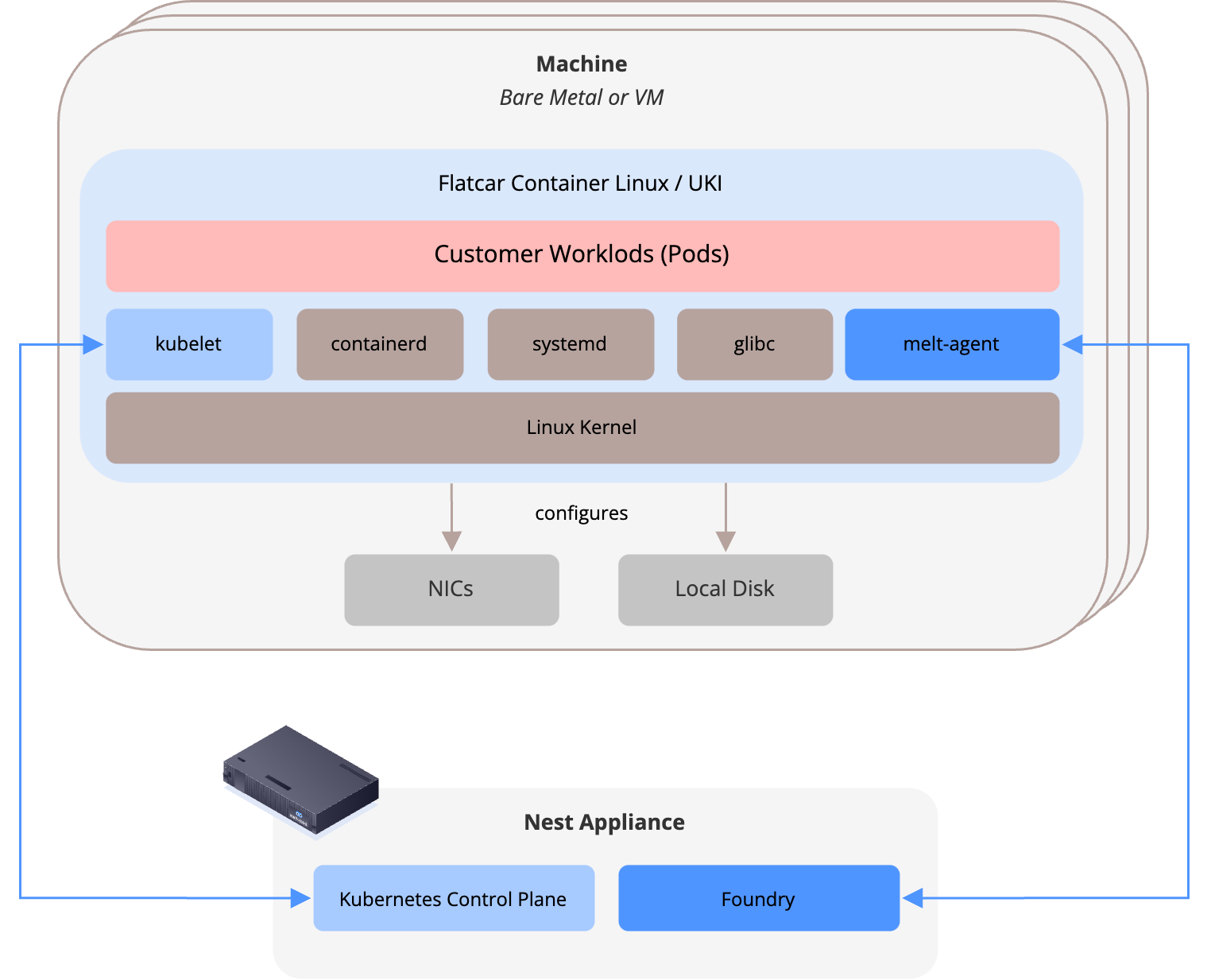
- At its heart, Machines run a hardened configuration of the Flatcar Container Linux Operating System, a minimal OS designed to run container workloads.
- It is immutable and stateless (except a cache partition to hold the container images)
- It is made up of the following components:
- the Linux Kernel, glibc and other foundational services
- systemd to run services
- melt-agent which interacts with the meltcloud platform to send diagnostics and receive instructions
- containerd to run containers
- kubelet to run Kubernetes workloads
- network configuration from its Network Profile: IPs, bonds, VLANs, addresses and routes.
Managed Lifecycle
A Machine is joined to the meltcloud platform by booting from Enrollment images. Once enrolled, a Machine is fully automated and controlled by the Nest Appliance during its whole lifecycle:
- Roughly every month, meltcloud releases new Machine Images that contain up-to-date versions of the Linux Kernel, systemd, containerd & kubelet. These updates can be applied autonomously in configurable maintenance windows.
- All user changes (changing the hostname, assigning to a different cluster, adding a label, unassigning or decomissioning a Machine) are also gracefully rolled out by the Nest appliance (no manual interactions).
Due to its immutable nature, each change to a Machine is applied by rebooting the Machine. Group the Machines into Machine Pools to ensure high availability during upgrades.
Revisions
Most changes to a Machine (i.e. a hostname change, changes to Machine Pools, version upgrades, ...) require a reboot to adopt the new settings.
To allow for a controlled rollout that doesn't disrupt the workloads, Revisions were introduced:
- For each change on Machines that require a reboot, a new Revision containing the new settings is created
- The revision can either be rolled out to the Machine instantly (by saving the changes with Save Machine & Apply) or applied manually (by saving the changes with Save Machine and applying the revision in the Revisions tab later)
Revision Rollout
When a revision is being applied, the following happens:
- The Machine is cordoned and drained on the Kubernetes API
- The Machine is gracefully stopped, boots into the new revision and joins the cluster again
- The Machine is uncordoned on the Kubernetes API
- receives workload again.
The rollout operation is fully transparent and can be observed in the operations log. If the operation fails or times out, it will transition to the failed state and can be retried afterward.