
Requirements (self-hosted Nest)
This page describes the network architecture and connectivity requirements when self-hosting Nest.
Architecture
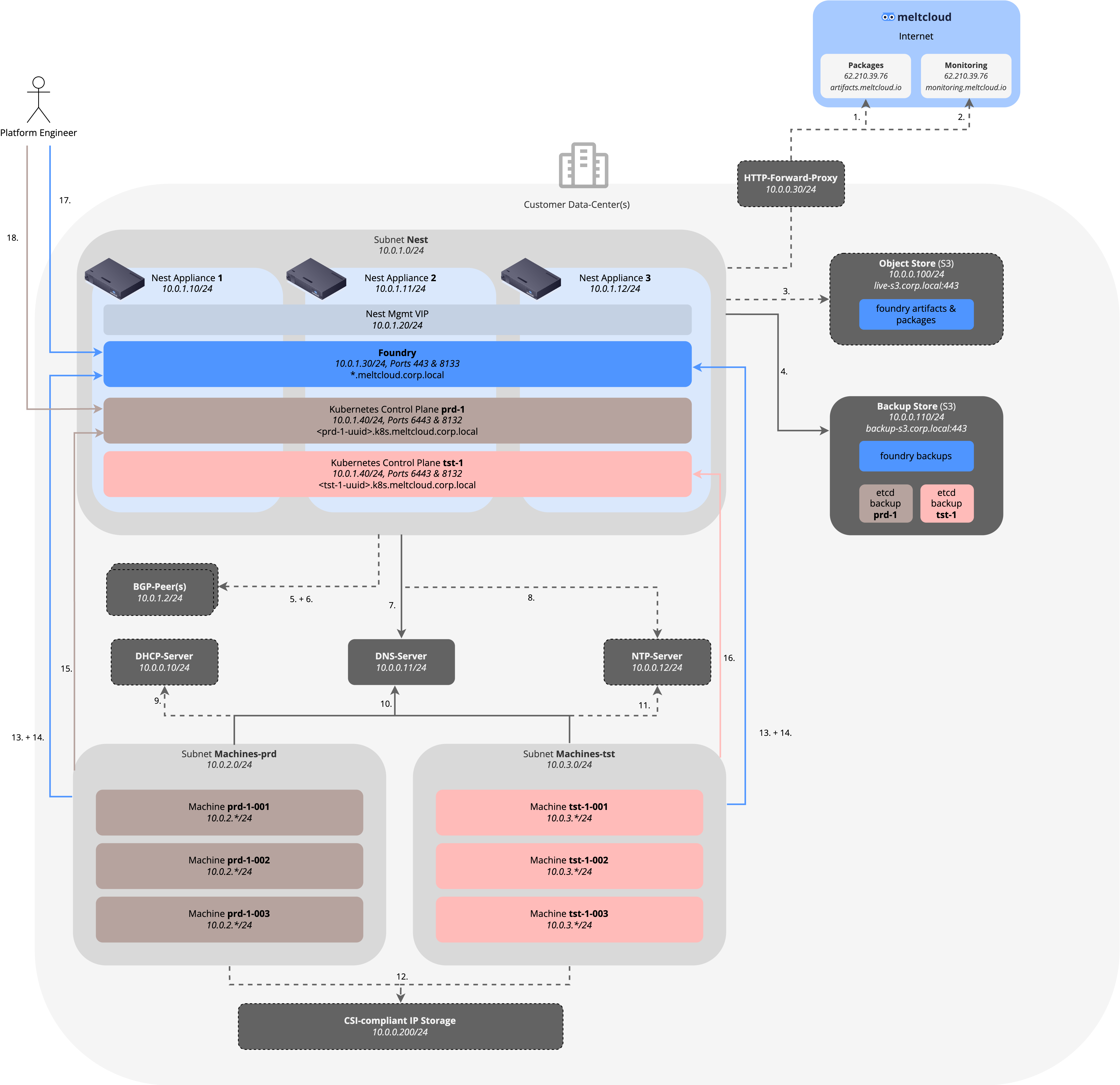
The following image depicts the involved components and their connectivity flows. To illustrate it with examples, we have chosen the 10.0.0.0/8 RFC1918 range and the domain corp.local as an example – please adapt it to your setup.
Customer-provided Services
As shown in the picture above, meltcloud requires the following services to be provided by the customer:
- DNS: to register the internal hostnames (
*.meltcloud.corp.local) and to resolve all internal and external destinations - NTP-Server, optional: to synchronize time of Machines. Strongly recommended to avoid issues with TLS client certificates. If none provided, Machines will fall back to
*.flatcar.pool.ntp.org. - DHCP-Server, optional: to provide IP addresses, routes, DNS & NTP servers for all Machines. Alternatively, you can use meltcloud's IPAM addressing mode. See Subnet Addressing for details.
- BGP Peer, optional: only when Nest is installed with BGP announcements instead of L2. A switch or router configured to accept a BGP session from each Nest instance, so that the Nest can announce its VIPs.
- Object Store (S3), optional: to store Foundry artifacts and packages (recommended for production, to avoid storing them on the Nest appliance)
- Backup Store (S3): to store Foundry and control plane backups for disaster recovery purposes
- Egress Internet Connectivity (required unless Airgapped): Connectivity to
artifacts.meltcloud.ioormonitoring.meltcloud.io. An HTTP forward proxy can be used.
Port Matrix
The following table shows all required connectivity according to the image above:
| ID | Source | Destination | Ports/Protocols | Reason | Required | Comment |
|---|---|---|---|---|---|---|
| 1 | Subnet Nest (10.0.1.0/24) | artifacts.meltcloud.io (62.10.39.76) | 443/tcp (HTTPS) | To download package updates | Yes, unless Airgapped | Dedicated IP (no CDN). HTTP proxy supported. |
| 2 | Subnet Nest (10.0.1.0/24) | monitoring.meltcloud.io (62.10.39.76) | 443/tcp (HTTPS) | To push metrics data for remote support | Yes, unless Airgapped | Dedicated IP (no CDN). HTTP proxy supported. |
| 3 | Subnet Nest (10.0.1.0/24) | live-s3.corp.local (10.0.0.100) | 443/tcp (HTTPS) | To store Foundry artifacts on packages | No | To avoid storing large files on Nest. Recommended for bigger setups/when S3 is available in-house. |
| 4 | Subnet Nest (10.0.1.0/24) | backup-s3.corp.local (10.0.0.110) | 443/tcp (HTTPS) | To store Foundry and control plane backups for DR | Yes | Can also be consumed as an additional service from meltcloud (if not available in-house) |
| 5 | Subnet Nest (10.0.1.0/24) | BGP-Peer(s) (10.0.0.2, 10.0.1.2) | 179/tcp (BGP) | To announce the VIPs to the network | Only with BGP | Not required with L2 announcements. The peer is usually the switch the Nest is attached to |
| 6 | Subnet Nest (10.0.1.0/24) | BGP-Peer(s) (10.0.0.2, 10.0.1.2) | 3784/udp (BFD) | To detect a failed peer in under a second | Only with BFD | Optional per peer. Without it a dead peer takes the BGP hold time, 90s by default |
| 7 | Subnet Nest (10.0.1.0/24) | DNS-Server (10.0.0.11) | 53/udp/tcp (DNS) | To resolve hostnames | Yes | |
| 8 | Subnet Nest (10.0.1.0/24) | NTP-Server (10.0.0.12) | 123/udp (NTP) | To synchronize time | No | If unset, falls back to *.flatcar.pool.ntp.org |
| 9 | Subnets Machines-* (10.0.2-3.0/24) | DHCP-Server (10.0.0.10) | 67/udp (DHCP) | To retrieve IPs, routes, DNS & NTP server | No | Only with DHCP addressing. Not needed with IPAM |
| 10 | Subnets Machines-* (10.0.2-3.0/24) | DNS-Server (10.0.0.11) | 53/udp/tcp (DNS) | To resolve hostnames | Yes | |
| 11 | Subnets Machines-* (10.0.2-3.0/24) | NTP-Server (10.0.0.12) | 123/udp (NTP) | To synchronize time | No | If unset, falls back to *.flatcar.pool.ntp.org |
| 12 | Subnets Machines-* (10.0.2-3.0/24) | CSI-compliant IP Storage (10.0.0.200/24) | NFS, iSCSI, ... | For persistent volumes | No | Depends on vendor/technology |
| 13 | Subnets Machines-* (10.0.2-3.0/24) | Foundry, *.meltcloud.corp.local (10.0.1.30) | 443/tcp (HTTPS) | Agent <> Foundry interaction, downloading of packages | Yes | Uses TLS Client Certificates |
| 14 | Subnets Machines-* (10.0.2-3.0/24) | Foundry, agent.meltcloud.corp.local (10.0.1.30) | 8133/tcp (HTTPS) | Tunnelled TLS traffic for in-cluster Pod -> kube-apiserver traffic (as the SNI listener cannot be used for this traffic) | Yes | Same IP as ID 12, different port |
| 15 | Subnet Machines-prd (10.0.2.0/24) | Kubernetes Control Plane prd-1, <prd-1-uuid>.k8s.meltcloud.corp.local (10.0.1.40) | 6443/tcp, 8132/tcp (HTTPS) | Kubelet -> kube-apiserver and konnectivity traffic | Yes | Uses TLS Client Certificates. Every Cluster uses these same ports and is told apart by its hostname (SNI) |
| 16 | Subnet Machines-tst (10.0.3.0/24) | Kubernetes Control Plane tst-1, <tst-1-uuid>.k8s.meltcloud.corp.local (10.0.1.40) | 6443/tcp, 8132/tcp (HTTPS) | Kubelet -> kube-apiserver and konnectivity traffic | Yes | Uses TLS Client Certificates. Every Cluster uses these same ports and is told apart by its hostname (SNI) |
| 17 | platform engineer | Foundry, *.meltcloud.corp.local (10.0.1.30) | 443/tcp (HTTPS) | web or API interaction | Yes | Allow Websockets if going over a HTTP proxy |
| 18 | platform engineer | Kubernetes Control Plane prd-1, <prd-1-uuid>.k8s.meltcloud.corp.local (10.0.1.40) | 6443/tcp (HTTPS) | kubectl interaction | No | The admin kubeconfig uses TLS Client Certificates, the user kubeconfig authenticates via OIDC |
DNS Entries & TLS Certificates
The following hostnames must resolve to the IPs below. Foundry also requires TLS server certificates for some of its hostnames; those certificates have to be provided (i.e. from a Customer or Public CA).
For the Foundry hostnames we recommend using wildcards (for DNS and TLS Certificates). If that is not possible, you can also create the specific entries as found in the list below (except for the Cluster hostnames, where a wildcard DNS entry is required).
| Hostname | Resolves to | Used for | Recommended DNS Entry | Recommended TLS Certificate | Certificate Issued By |
|---|---|---|---|---|---|
app.meltcloud.corp.local | Foundry (10.0.1.30) | Web browser and Terraform access | *.meltcloud.corp.local | SAN *.meltcloud.corp.local | Customer or Public CA |
agent.meltcloud.corp.local | Foundry (10.0.1.30) | Agent -> API access, Pod tunnel on 8133 | *.meltcloud.corp.local | SAN *.meltcloud.corp.local | Customer or Public CA |
pkg.meltcloud.corp.local | Foundry (10.0.1.30) | Reading local packages for Machines | *.meltcloud.corp.local | SAN *.meltcloud.corp.local | Customer or Public CA |
pkg-push.meltcloud.corp.local | Foundry (10.0.1.30) | Pushing local packages for Machines | *.meltcloud.corp.local | SAN *.meltcloud.corp.local | Customer or Public CA |
s3.meltcloud.corp.local | Foundry (10.0.1.30) | S3 API, only when using the built-in object store | *.meltcloud.corp.local | SAN *.meltcloud.corp.local | Customer or Public CA |
<prd-1-uuid>.k8s.meltcloud.corp.local | Hosted Control Planes (10.0.1.40) | kube-apiserver and konnectivity | *.k8s.meltcloud.corp.local (Wildcard required) | n/a | Auto-generated |